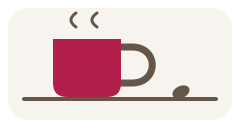
1. Choose an anchor
Pick something that already happens, like setting down your morning mug. Let that familiar moment be your reminder.
Gentle habit building for Windows
Choose a routine, pair it with one small action, and celebrate your moment. Bloomstep keeps track and grows a personal garden along the way—without streak pressure.
Early Windows preview · Owner testing only · Sign-in required
Optional website measurement is off unless you choose it. No tracking is required to download.
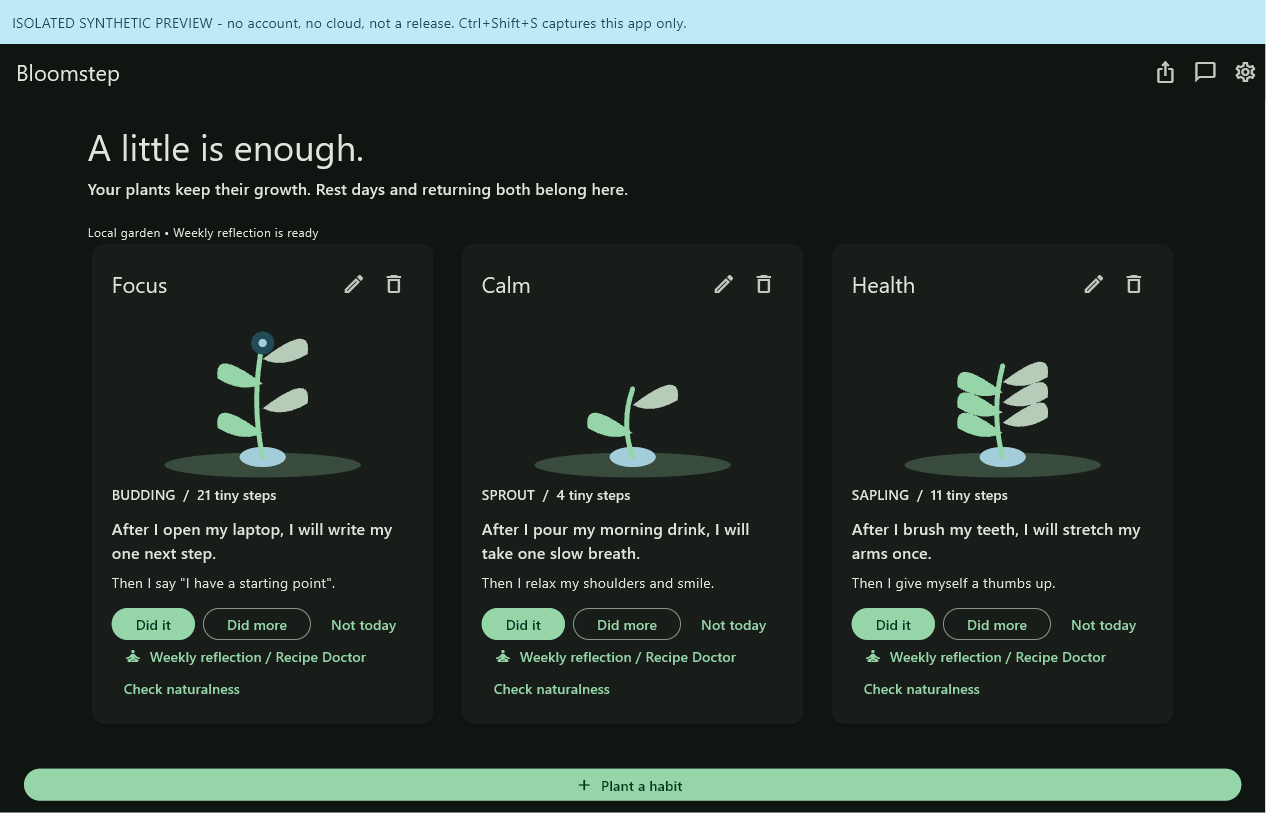
A small rhythm you can repeat
For people who want a gentle routine alongside their Windows day. For example: after opening your laptop, write one sentence toward a personal project, then mark the moment in your garden. Start with one habit; change the recipe when it stops fitting your day.
Pick something that already happens, like setting down your morning mug. Let that familiar moment be your reminder.
After setting down your mug, try one gentle shoulder roll. In Bloomstep, pair the routine and action in your recipe. Make it smaller if it feels difficult; choose an action that is safe for you.
A quiet smile or a little “there we go” can mark the win. Choose what feels natural to you. Check in with “did it” in Bloomstep; “not today” keeps your plant's growth.
Bloomstep is an independent app inspired by the Tiny Habits method; it is not affiliated with or endorsed by BJ Fogg or Tiny Habits. These are original Bloomstep examples, not book excerpts. Optional learning: official Tiny Habits website and official book information. Neither is required to use Bloomstep.
“Not today” is a choice, not a failure. Your plant keeps its growth, so you can come back without starting over.
Check in with “did it” or “did more.” Watch a seed become a plant as you make room for your new habit.
Notice what feels easy, adjust what does not, and move habits that feel natural into your Grove.
Early preview — not yet verified for general use. Version 0.1.0-preview.14 is an owner-test candidate, not a general customer release. Its files are publicly reachable, but download them only if you are the designated tester. Launch after installation and the complete sign-in and app journey have not been verified. It requires 64-bit Windows (x64 or ARM64), sign-in and is designed for ages 16 and up. The installer is unsigned. Read the installation help if a warning appears; stop for malware or device-policy blocks. There is no subscription or payment step.
Version 0.1.0-preview.12 is an older, superseded owner-test build.
One installer for 64-bit Windows. It chooses the right version for your PC. Installation works offline; signing in requires an internet connection.
Windows installation help before opening the installer
Owner-test download (designated testers only)
Download size: 22.26 MB.
The secondary x64 and ARM64 installers are for troubleshooting by designated testers. Windows needs a 64-bit version; 32-bit Windows is not supported.
Exact download size: 22.26 MB (22,261,590 bytes).
The preview is free to download and use; no payment step is required. Sign-in is needed to use the app. The release files are hosted on GitHub and are intended only for the owner test.
Optional and off by default. If you turn it on, this page sends only later page and button activity plus broad, pre-set source labels. It does not send your name, email address or activity across visits. Turn it off to stop future counts; this choice does not affect the preview link. Read the privacy details.
Website measurement is off. Downloads work independently of measurement and service availability.
Current preview: 0.1.0-preview.14. Designated testers can check filenames and file fingerprints on the preview details page before opening a file.
Browser wording and controls vary by version and managed policy. These steps describe where to find a download; they do not claim a warning was observed on your device. A browser block is a reason to stop, not permission to bypass protection.

Press Ctrl+J to open Downloads, or use Settings and more (…) → Downloads. Locate the Bloomstep setup filename. A download flyout may also appear near the toolbar. If Edge flags or blocks a file, read the exact message; a reputation prompt and a malware or organization-policy block are different. Do not use a “Keep” option simply because this page names the app. Cancel if the source, checksum or policy cannot be confirmed.
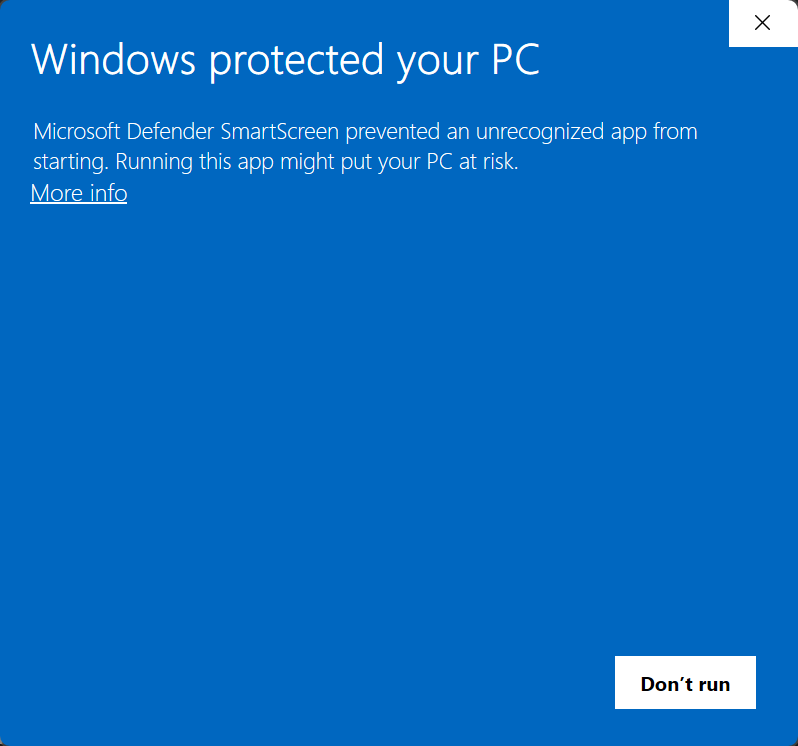
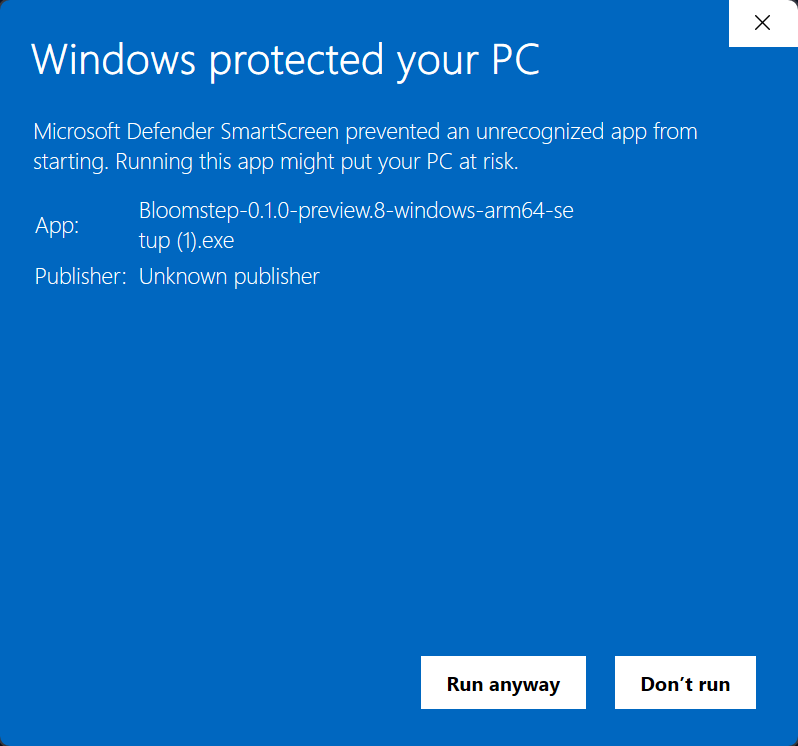
These are real user-provided warnings for the older Bloomstep-0.1.0-preview.8-windows-arm64-setup (1).exe. The “(1)” is added by the browser for a repeated download; it does not identify a different release. Browser and Windows versions are unknown. These examples do not establish the current installer's safety or show that it starts successfully.
Only for an unknown-reputation prompt, if the exact source, architecture and SHA-256 match the published release, your device policy permits the action, and you understand and accept the risk, Edge may offer More options (…) → Keep → Keep anyway. Read the warning first; the customer's first panel shows See more. Controls may differ or be unavailable. For malware or policy blocks, stop; if any check is uncertain, cancel. A checksum establishes consistency, not safety or signing. Do not disable protection.
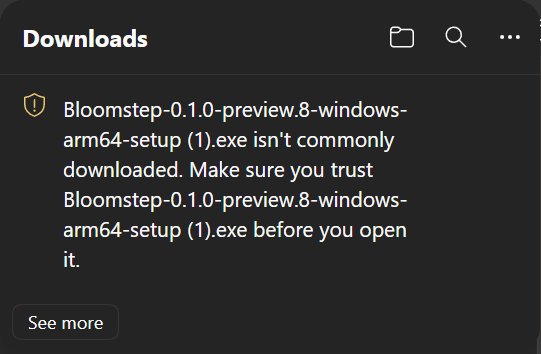
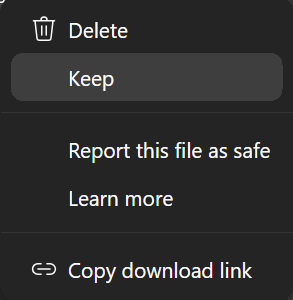
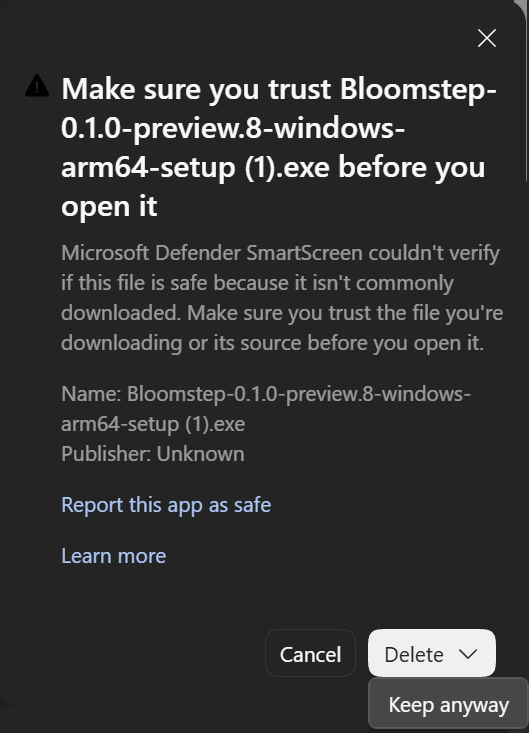
Microsoft's explanation of SmartScreen warnings and blocks. Keep protection enabled.
Press Ctrl+J to open Download history, or use the three-dot menu → Downloads. Recent downloads may also appear in the toolbar. Find the exact Bloomstep setup filename. If Chrome reports a dangerous or blocked download, stop; do not disable Safe Browsing or assume an unsigned preview is harmless.
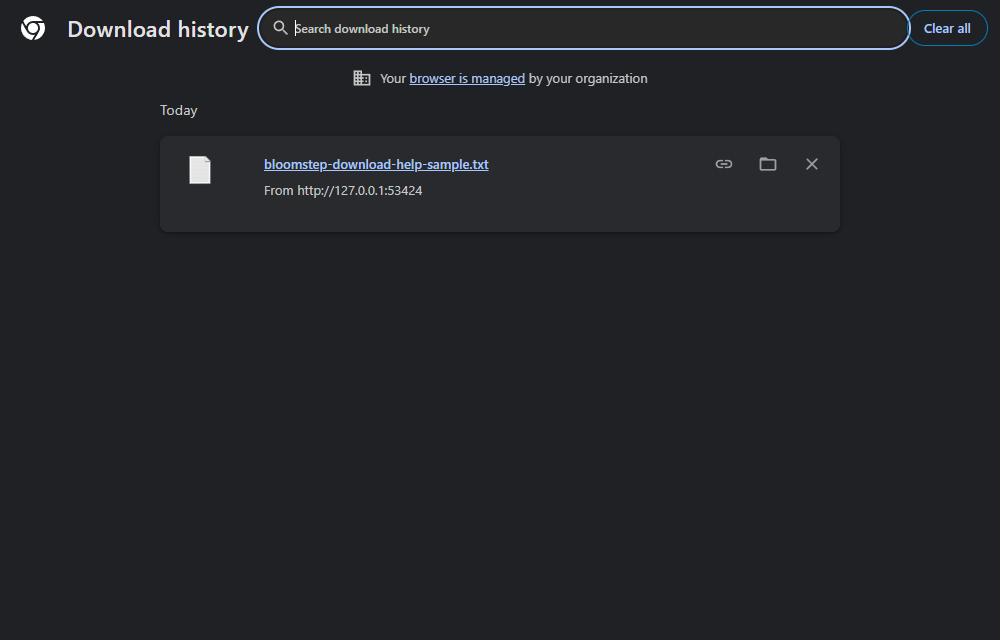
Google's explanation of dangerous-download warnings. Take warnings seriously; do not disable protection.
Press Ctrl+J to open Downloads, or select the downloads arrow in the toolbar. Firefox controls and warning text can vary by version and policy. This Firefox download UI has not been captured. If the browser says a file is dangerous or blocked, stop and do not disable protection.
For an unknown-reputation warning only, first verify the exact source, filename, architecture and SHA-256 against the release page. Continue only if device policy permits and you understand and accept the risk. Windows may show More info, then Run anyway; if either control is absent or any check is uncertain, choose Don't run. For malware or policy blocks, stop. Never turn off protections or use administrator rights to get past a warning. A matching checksum is not a safety or signing guarantee.
For any browser, wait for a completed file, use its folder action to locate it, then verify the version, architecture and checksum before opening. If verification fails, stop. Do not rename a partial download or assume a click succeeded; you can cancel and return to the release page later.
If you choose, keep a receipt in this page's memory and export it to a file. Nothing is saved in browser storage. Closing or reloading the page removes the in-memory receipt. It contains only random event IDs, fixed page/download event names and UTC dates, not URLs or your habits.
Linking the exported receipt in app Settings is a separate, voluntary choice requiring app analytics consent. The installer has its own unchecked measurement choice. Without these choices, installation and app activity cannot be connected to this visit.
Receipt collection is off.
Your plant does not wilt and your progress is not taken away. Come back when you can, or make the action smaller.
This owner-test preview is free; there is no subscription or payment step. It is not verified for general use.
You need to sign in to get started. Once your garden is available on the device, you can work locally during a connection interruption and sync when connected again. Signing in and syncing need an internet connection, and online service may be interrupted. Sign-in options depend on the available providers.
Bloomstep uses a sign-in service from Microsoft. Depending on your chosen provider, the sign-in page may show a Microsoft service address such as ciamlogin.com. Enter your password only on the genuine Google or Microsoft sign-in page you chose; Bloomstep does not collect your password.
Email store-developer@outlook.com for support or privacy requests, including when you cannot sign in. After sign-in, you can also use the app's private feedback option. Do not include passwords or sensitive habit details. For a non-sensitive bug, use the project's public GitHub issues; posting requires a GitHub account and the report is public. Never post private records, account exports, credentials or privacy requests there. Feedback is not an email signup, and a reply or response time is not guaranteed. This website does not collect contact details or offer a mailing list.
Use Settings to export your records as JSON. The app also has deletion controls for habits, private feedback and your cloud account data. Offline deletion requests wait for sync; exported files and provider backups are separate copies.
No. Bloomstep is a habit-building tool, not medical care or treatment. Choose actions that are safe for you. It is designed for ages 16 and up.
This preview installer is not digitally signed, so Windows may show an unknown-publisher/reputation prompt. A warning alone doesn't establish malware, and we cannot guarantee safety. Not all unknown programs are malicious, as Microsoft explains. Before opening a file, compare its source, architecture, exact filename and SHA-256 with the current releases page. A matching SHA-256 verifies that the bytes match the published checksum; it does not prove the file is safe or digitally signed.
An unknown-reputation prompt is different from a warning that identifies a known-malicious or dangerous file, and from a download blocked by your organization or device policy. For those malware or policy blocks, stop; do not try to override them. If an Edge or Windows prompt is unclear, cancel and ask your device administrator.
Only for an unknown-reputation prompt, if the exact source, filename and SHA-256 match, your device policy permits the action, and you understand and accept the risk, Windows may offer More info → Run anyway. If it does not appear or any check is uncertain, cancel. Cancellation is always an option. Leave SmartScreen, antivirus and Safe Browsing enabled; do not bypass a managed policy or use elevation as a way around a warning. This installer is intended for your Windows account and does not need administrator rights.
Microsoft's guide to Edge warnings explains how SmartScreen checks downloads. Keep protection enabled; your browser's wording and available options may differ.
Bloomstep is an early, unsigned Windows app for trying tiny, routine-linked habits, check-ins and a personal growing garden. This version is for designated owner testing only; it has not been verified for general use. Sign-in is required, and some features and sign-in options are still being refined. It is not a complete release or medical care. There is no Microsoft Store version yet. Private feedback is available in the app after sign-in.
Your habit text is never sold or used for ads. The public website does not use third-party product analytics. A separate testing website uses Google Analytics only when its tester chooses to allow it; test activity is not customer activity. This release does not include AI features; any future AI feature would be explained and optional. Your garden is stored on your device and syncs to your private account when connected. Website counts never include habit or feedback text. The app's local database uses your Windows account protections but is not encrypted.
Website measurement is off by default. If you choose to turn it on beside the preview links, this page counts activity from that point onward: a page view, clicks on the main or closing button, and the type of release link clicked. It records only broad source categories and pre-set source labels. Unknown websites and unapproved campaign values are not sent. A short-lived random code helps avoid counting a retried event twice; it is used for up to five minutes to avoid duplicate counts, then removed during subsequent service activity. It is not a visitor identifier.
Review or change optional website measurement beside the download links.
Your choice stays in this page only and resets when you reload it. It does not follow you to another page or visit. Turn it off to stop future counts; earlier anonymous counts cannot be linked back to you. A click count does not prove a file was downloaded or installed. Counts are not unique visitor totals or measures of habit success.
No cookies, browser-storage identifiers, fingerprints, IP addresses or full page addresses are collected by website measurement. Browser Do Not Track and Global Privacy Control settings turn off sending. Visits without consent are unknown, not counted as zero. Website counts are separate from optional in-app measurements, which are off by default. The site does not match website visits to app accounts.
Daily website counts are kept for up to 90 days. Optional app activity records are kept for 396 days (13 months) when you choose app measurement. Records of requests to Bloomstep's services and daily summaries are kept for 30 days. Azure and GitHub host the website, services and downloads; they may keep their own standard access and security records.
Page comparisons are currently off on the public website. If used later, and only after you opt into website measurement, a temporary code in this page could note which of two reviewed wordings or layouts you saw and whether you clicked a main button or release link. It would not change prices, sign-in, download, safety or privacy choices, and it would not follow you to another visit. Turning measurement off removes that visit's comparison record. Review history is limited to 500 entries and 50 completed comparisons; this is a storage limit, not a promise that every record is deleted within 90 days. Click results do not show installs or habit success.
Draft privacy notice for the limited preview; updated 12 October 2026. Bloomstep is Sampath Kumar's personal independent project. Sampath Kumar is responsible for how the project uses your information. Bloomstep is not operated by Microsoft, and Microsoft's hosting or Sampath Kumar's employment does not mean Microsoft endorses the app.
When you sign in, Bloomstep syncs your recipes, check-ins, reflections, feedback and basic account settings to your private account. Your sign-in provider handles your sign-in and the identity details it requests; Bloomstep uses the returned identity to give you account access. Bloomstep also keeps service records about when feedback arrives and when a team reply is sent. These are separate from optional app measurements. Do not store medical records, passwords or other sensitive information in Bloomstep.
Website and app measurements are optional and are not required to download or use the app. If you opt in, they help us understand broad product activity; they are not advertising profiles. The website choice resets when you reload the page. The app choice is stored on your device. You can turn either choice off to stop future optional measurements. This does not stop information needed to provide your account or respond to a support request. This notice does not claim compliance with a particular privacy law or certification; the rights that apply depend on where you live and the law that applies.
Optional app measurements are off by default. If enabled, limited technical error reports may include an error category and where it occurred, but not the error message, technical trace or your habit or account text. Some unexpected app closures may not be captured, so these reports do not show how often the app crashes. A separate optional reminder choice may record when you enable or disable in-app reminders and whether they remain enabled after 30 days. It does not tell us whether Windows allowed or delivered a reminder, and it does not include your habit text, location or complete reminder history. Turning off either choice stops future records; previously synced records follow the retention and deletion rules below.
Microsoft Azure hosts this website and its services. Azure Cosmos DB stores private account records, and Microsoft Entra External ID handles sign-in. Google or Microsoft personal accounts are involved only if you choose that sign-in option; availability depends on the provider setup. GitHub hosts the project's source files and downloads and handles public bug reports under its own policies. These services may process network and security information independently of your measurement choices.
No third-party product analytics tools are enabled on the public website. A separate testing website uses Google Analytics only after a tester opts in; test visits have been received there, but that does not mean customer activity or analytics are enabled on the public site. It does not show that people installed or used the app. This release does not include an advertising, payment or AI service; any future AI feature would be explained and optional.
Optional app measurements are kept for 396 days from when the activity originally happened (13 months). Daily website counts and page-comparison records are kept for up to 90 days. Records of requests to Bloomstep's services and daily summaries are kept for 30 days. A temporary random code helps avoid duplicate website counts for up to five minutes, then is removed during subsequent service activity.
Your garden, feedback and settings do not expire because you stop using the app. They remain until you use the matching deletion control. Deleting an account or record removes its active content, but a small marker remains to prevent an offline device from bringing deleted content back when it syncs. Turn off optional measurements to stop future event records. Use Settings to export or delete your records. Offline deletion requests wait until they can sync; exported files are separate copies you control.
Cloud sync capacity is limited in this preview, and online service may be unavailable at times. When that happens, the app indicates the service is unavailable; your local garden remains on your device.
Azure backup settings checked on 10 October 2026 specify backups every four hours, an eight-hour retention setting and storage in more than one geographic region. These settings do not guarantee that a backup will be available or that a complete restore will work. This preview does not promise a recovery service or a recovery deadline. Deleting information from the active database does not immediately remove it from existing backups, and we do not know exactly when providers delete backup copies. A test using a local copy of the service checked that deletion markers remain after an app restart; restoring from Azure backups and keeping those markers after a restore have not been tested. We do not know whether restoring a backup could bring back deleted information. Retention periods for provider security logs, sign-in records and support email copies are also unconfirmed.
For support or a request to access, correct or delete your information, email store-developer@outlook.com. You do not need to sign in to email. Private in-app feedback is also available after sign-in; Settings offers export and deletion controls. Include only the information needed to explain your request. We may need to confirm account ownership. A response time is not guaranteed. Where applicable, you may also contact your local data-protection authority.
What is not yet confirmed: how long providers keep security logs, sign-in records, support email copies and backup copies, and how Azure restores affect deleted records. This notice does not claim these details are resolved. Do not post personal information or privacy requests in public GitHub issues; use that route only for non-sensitive bug reports.